
Loading game...
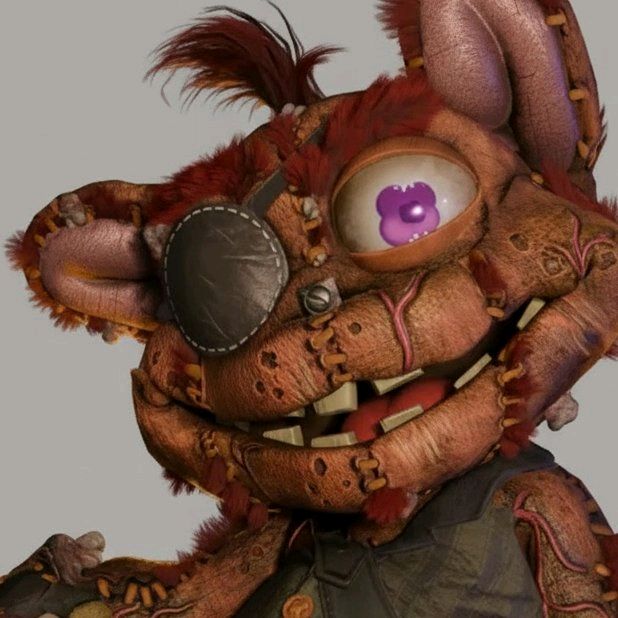 giblet
3D Interactive Showcase
Welcome to the ultimate 3D Interactive Showcase, a cutting-edge platform designed for art enthusiasts and character design fans. This interactive 3D viewer allows you to seamlessly explore high-quality models right from your browser. With just a few clicks, you can rotate the camera, switch between beautifully rendered characters, and trigger built-in animations synchronized with immersive sound effects. Whether you're looking for inspiration or simply want to appreciate detailed 3D art, this tool offers a highly customizable audio-visual experience. If you enjoy unique digital experiences, you can also explore more interactive ambient projects to spark your creativity. Jump in and start interacting with stunning models today!
How to Play 3D Interactive Showcase
Navigating the 3D Interactive Showcase is incredibly intuitive and designed for a smooth user experience. Start by using the bottom thumbnail carousel to browse and select different high-quality 3D models. Once your chosen character appears on the screen, you can click and drag, or swipe on mobile devices, to rotate the camera around the model and view it from any angle. To bring the characters to life, simply tap or click directly on the 3D model. This action will cycle through the character's built-in animations, complete with perfectly synchronized sound effects. The floating user interface allows you to further customize your viewing environment, letting you adjust the background colors and auto-rotation speed to suit your personal preferences. It's a completely seamless process that requires no downloads to enjoy.
Tips & Tricks for 3D Interactive Showcase
To get the most out of your 3D Interactive Showcase online experience, try these helpful tips. First, experiment with the dark gradient background settings to make lighter character models truly pop on your screen. Second, don't forget to test the raycasting feature by tapping different parts of the model to see how the animations transition smoothly. Third, turn up your volume to fully appreciate the procedural audio generation and synchronized sound effects that accompany each movement. Finally, adjust the auto-rotation speed in the floating UI for a hands-free, cinematic viewing angle. Ready for another unique visual journey? Feel free to discover similar experimental showcases to keep the inspiration flowing.

Unblock More Fun on Mobile!
Scan to Keep Playing!