
Loading game...
 justelijahhhh
Jem car
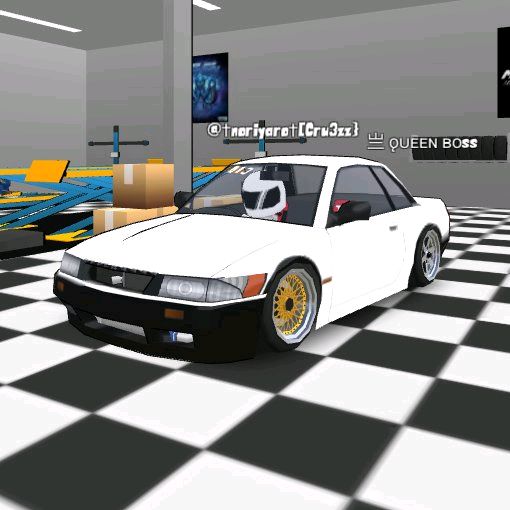
Welcome to Jem Car Custom Garage, the ultimate 3D car tuning simulator designed for true JDM enthusiasts. If you love modifying iconic vehicles like the Skyline R34 or Civic EG6, this game offers an unparalleled virtual showroom experience right in your browser. You can experiment with custom paint jobs, install aggressive body kits, and adjust suspension settings to create your dream ride. The procedural audio and stunning graphics make every engine rev feel incredibly realistic. Whether you're building a track monster or a street cruiser, the creative possibilities are endless. If you enjoy immersive mechanics, you can explore more simulation games to satisfy your craving for realistic gameplay.
How to Play Jem Car Custom Garage
Getting started with this JDM car simulator is incredibly easy and entirely interactive. First, select your preferred vehicle model from the main menu dropdown. Once your car is loaded into the stunning 3D showroom, use your mouse or touch controls to rotate the camera and zoom in on specific details. Navigate through the sleek user interface to access different customization tabs. In the paint section, you can experiment with various colors to find the perfect finish. Switch to the body kits tab to swap out bumpers and add stylish spoilers. Head over to the performance section to lower your suspension and upgrade the engine for realistic visual and audio feedback. Finally, click the camera icon to enter photo mode, capture your masterpiece, and export the image to share your custom build with friends.
Tips & Tricks for Jem Car Custom Garage
To master this car custom garage, start by familiarizing yourself with the camera controls to inspect your modifications from every possible angle. When adjusting the suspension, balance the lowered stance with the specific body kit you've chosen to ensure a clean, aggressive look without visual clipping. Don't forget to turn up your volume to fully experience the procedural audio effects, like the satisfying ratcheting of wrenches and powerful engine revs. Always use the built-in photo mode to hide the interface before taking screenshots for a professional finish. Ready for another challenge? Check out similar simulation games to discover even more exciting virtual experiences.



Unblock More Fun on Mobile!
Scan to Keep Playing!