
Loading game...
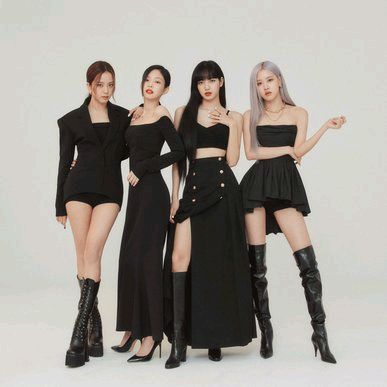 Blink In Your Area
Select Your Bias Game
Welcome to the ultimate Select Your Bias game, a highly interactive fan application designed especially for dedicated K-pop lovers and Blinks! If you have ever wondered who is your Blackpink bias quiz style, this is the perfect place to make your choice. Dive into a beautifully crafted dark theme aesthetic featuring glassmorphism effects and dynamic member portraits. When you pick your favorite idol, you don't just get a simple screen. You will experience a fully customized result card complete with unique quotes, signature color confetti, and exciting crowd cheers. It's the ultimate way to celebrate your fandom online. If you want to explore different interactive experiences, you can always discover more other fan applications on our platform.
How to Play Select Your Bias Game
Learning how to play the Select Your Bias game online is incredibly simple and fun. First, wait for the beautifully designed application to load on your screen. You will see a stylish grid layout featuring portraits of the four talented Blackpink members. Take your time to admire the design, then simply tap or click on the portrait of your absolute favorite member to make your selection. Instantly, the screen transforms with a gorgeous radial gradient and a customized confetti animation matched to your idol's specific color palette. You will also hear satisfying pop sounds and crowd cheers that make the moment feel special. If you change your mind, just click the back button to reset your choice. Finally, use the built-in share button to instantly generate a high-quality screenshot of your unique result card, ready to be posted on your favorite social media accounts!
Tips & Tricks for Select Your Bias Game
To get the most out of this Blackpink bias game, try clicking on every single member at least once! Each idol has her own unique character quote, specific color-themed confetti, and customized audio effects, so you won't want to miss any of them. Make sure your device's sound is turned on to fully enjoy the haptic feedback and crowd cheers. When you generate your screenshot, double-check that the floating text animation looks perfect before you hit the share button. This ensures your social media post looks incredibly polished and aesthetic. Once you have saved all four unique result cards, feel free to check out similar other interactive fan tools to keep the entertainment going.

Unblock More Fun on Mobile!
Scan to Keep Playing!